GPA Calculator
Last updated: 28 June 2026
Research and drafting assisted by AI.
- The GPA system was invented at Yale University in 1785, making it one of the oldest standardised academic grading systems in the world.
- In Germany, university grades run from 1.0 (best) to 5.0 (fail) , the exact opposite of the US system. International applicants frequently confuse the scales.
- A perfect 4.0 GPA across all four years of a US degree requires an A in every class. Studies show GPA correlates with income only up to a point , after which social skills and networking dominate.
GPA Calculator
A GPA calculator converts your course grades and credit hours into a Grade Point Average, the standard academic performance metric used by schools and universities. It is used by students, academic advisors, and admissions officers to track academic standing, determine eligibility for scholarships, and assess university applications.
How to Use the GPA Calculator
- Enter each course or subject name (optional, for your reference).
- Enter the number of credit hours (or units) for each course.
- Enter the grade received for each course, either as a letter grade (A, B+, C, etc.) or as a percentage.
- Add all courses for the semester or your entire academic record.
- Click "Calculate" to see your semester GPA and cumulative GPA.
The Formula
GPA is calculated using a weighted average based on credit hours. The standard 4.0 scale is most common in the US, UK, and many international institutions.
Step 1: Convert each letter grade to a grade point value using the standard scale:
- A / A+ = 4.0
- A- = 3.7
- B+ = 3.3
- B = 3.0
- B- = 2.7
- C+ = 2.3
- C = 2.0
- C- = 1.7
- D+ = 1.3
- D = 1.0
- F = 0.0
Step 2: Multiply each course's grade points by its credit hours to get quality points.
Quality Points = Grade Point Value x Credit Hours
Step 3: Sum all quality points and divide by total credit hours:
GPA = Total Quality Points / Total Credit Hours
Some institutions use a 7.0 or 10.0 scale. Always check which scale your institution uses before calculating.
Real-World Example
A student has three courses in one semester:
- Mathematics: 4 credit hours, grade B+ (3.3 grade points)
- English Literature: 3 credit hours, grade A (4.0 grade points)
- Chemistry: 3 credit hours, grade C+ (2.3 grade points)
Quality points:
- Mathematics: 4 x 3.3 = 13.2
- English Literature: 3 x 4.0 = 12.0
- Chemistry: 3 x 2.3 = 6.9
Total quality points: 13.2 + 12.0 + 6.9 = 32.1 Total credit hours: 4 + 3 + 3 = 10
GPA = 32.1 / 10 = 3.21
This places the student on the B+ boundary, which typically qualifies for honour roll at most institutions.
Understanding GPA Benchmarks
Different thresholds carry different meanings depending on the institution and country. In the US, a GPA of 3.5 or above is generally considered Dean's List territory. A GPA below 2.0 often triggers academic probation. Graduate school admissions typically prefer applicants with a 3.0 or higher. UK universities use a different classification system: First Class Honours (70%+), Upper Second Class (60-69%), Lower Second Class (50-59%), and Third Class (40-49%). Some employers ask for a minimum GPA on applications, particularly in finance and engineering. Understanding where your GPA sits relative to these benchmarks helps you set realistic goals and identify courses where improvement will have the greatest impact on your average.
Reference Table: Grade points and a worked semester GPA
The first table gives the standard 4.0 grade-point values. The second applies them to a 14-credit semester, which totals 45.7 grade points and a GPA of 3.26.
| Letter grade | Grade points |
|---|---|
| A | 4.0 |
| A minus | 3.7 |
| B plus | 3.3 |
| B | 3.0 |
| B minus | 2.7 |
| C plus | 2.3 |
| C | 2.0 |
| D | 1.0 |
| F | 0.0 |
| Course | Grade | Credits | Points per credit | Grade points |
|---|---|---|---|---|
| Biology | A | 4 | 4.0 | 16.0 |
| Statistics | B plus | 3 | 3.3 | 9.9 |
| History | B | 3 | 3.0 | 9.0 |
| Chemistry | B minus | 4 | 2.7 | 10.8 |
Worked Example on Screen
The capture below shows GPA Calculator after the inputs were entered, with the result on screen. Enter the same values to reproduce it.
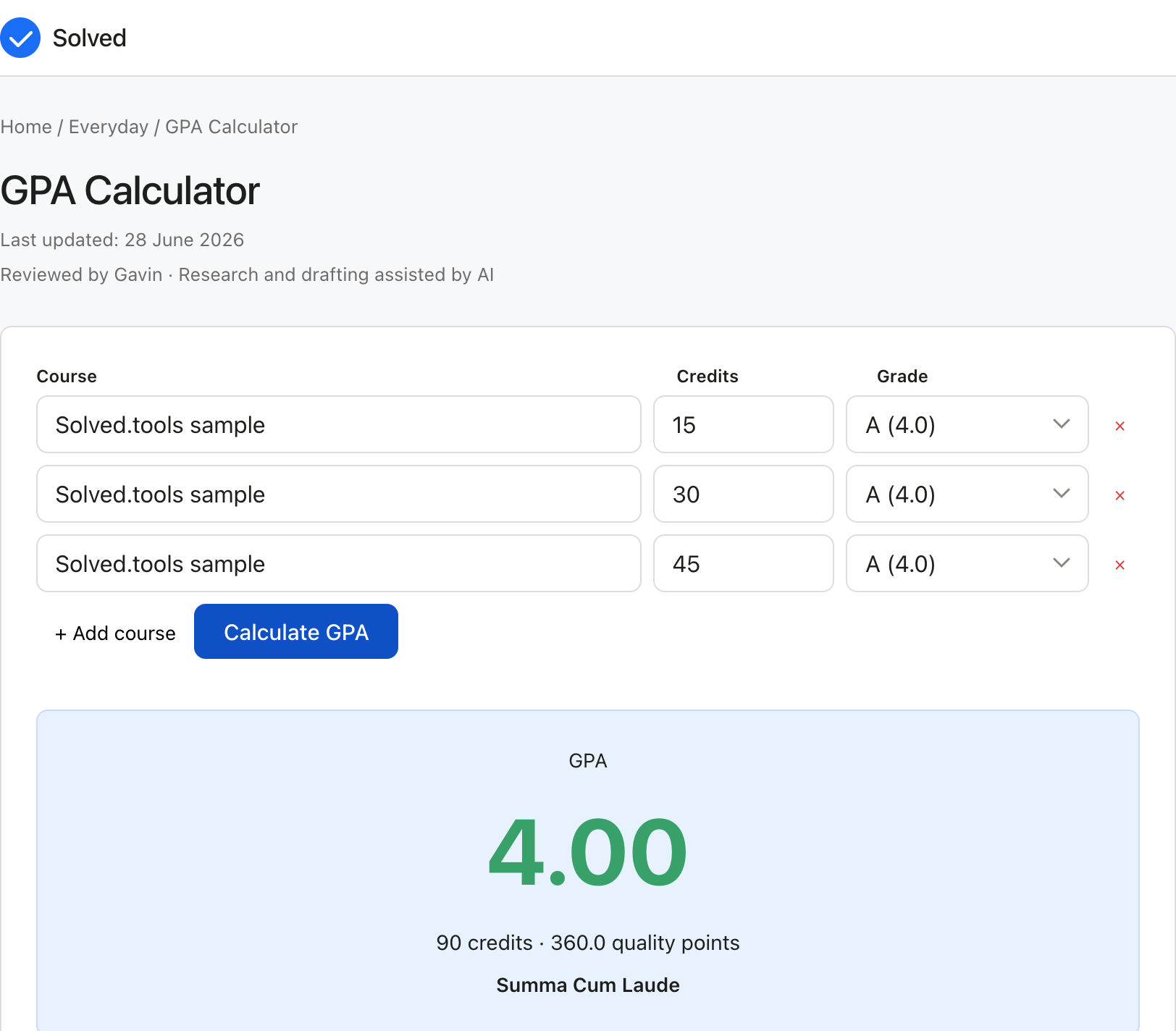
Captured from solved.tools on 10 September 2026.
Frequently Asked Questions
Does a failing grade always count towards my GPA? Yes, in most institutions an F (0.0 grade points) still contributes to your GPA calculation because the credit hours are included in the denominator even though you earn zero quality points. Some schools allow grade forgiveness or course repetition policies where the new grade replaces the old one, but this varies by institution.
What is the difference between semester GPA and cumulative GPA? Semester GPA reflects only the courses taken in a single term, while cumulative GPA is the weighted average across all semesters and all credit hours completed. Employers and graduate schools typically ask for cumulative GPA, but a strong semester GPA shows an upward trend if your cumulative figure is lower.
How many credit hours do I need to raise my GPA significantly? The further you are into your degree, the harder it is to move your cumulative GPA because existing credit hours act as an anchor. For example, if you have completed 60 credit hours with a 2.5 GPA, a perfect 4.0 semester of 15 credit hours would raise your cumulative GPA to approximately 2.73. Earlier in your degree, each semester carries more weight.
Is a 4.0 GPA always the maximum? Not always. Some institutions use a 4.3 or 4.5 scale where an A+ earns more than 4.0 points. Others use a 5.0 or 10.0 scale. International students should confirm which scale their institution uses and, when applying abroad, use a conversion tool or WES (World Education Services) evaluation to convert their grades to the local standard.
Common Inputs and How to Choose Them
Most GPA Calculator problems revolve around a small set of inputs.
each course or subject name (optional, for your reference) is usually the first value to pin down for the GPA Calculator.
the number of credit hours (or units) for each course sets the context the GPA Calculator needs for a sensible result.
the grade received for each course, either as a letter grade (A, B+, C, etc.) or as a percentage refines the GPA Calculator output where the data is available. Identifying the right values is the most important step for the GPA Calculator, because the answer is only as accurate as the data you put in. If a value is unknown, prefer a conservative estimate over a guess when using the GPA Calculator.## How to Interpret the Result The numerical answer from the GPA Calculator alone is rarely the whole story. Read the units, the precision, and any warnings shown alongside the GPA Calculator result. Understanding the path from inputs to output in the GPA Calculator makes it easier to spot errors, communicate the result to others, and reuse the method for related problems in the future.## Worked Examples A typical GPA Calculator run takes reasonable inputs, produces a sensible answer, and returns it in a single click. Example: A student has three courses in one semester: - Mathematics: 4 credit hours, grade B+ (3.3 grade points) - English Literature: 3 credit hours, grade A (4.0 grade points) - Chemistry: 3 credit hours, grade C+ (2.3 grade points) Quality points: - Mathematics: 4 x 3.3 = 13.2 - English Literature: 3 x 4.0 = 12.0 - Chemistry: 3 x 2.3 = 6.9 Total quality points: 13.2 + 12.0 + 6.9 = 32.1 Total credit hour## Common Mistakes to Avoid Common mistakes with the GPA Calculator:
Mixing up units (for example, entering one unit when the GPA Calculator expects another).
Forgetting to convert percentages to decimals or vice versa where the GPA Calculator formula requires it.
Using a snapshot value that no longer reflects reality for the GPA Calculator, especially for time-sensitive inputs like prices, rates, or counts.
Rounding intermediate steps too early and then carrying the rounded value forward in the GPA Calculator.
Treating the GPA Calculator as a substitute for professional advice when the decision is high-stakes.## Limitations and Assumptions No calculator is a perfect model of reality, and the GPA Calculator is no exception. The GPA Calculator makes simplifying assumptions to keep the math tractable: it ignores rare cases, applies default values where inputs are missing, and uses formulas that suit the typical situation rather than the exotic one. When your situation falls outside the typical case, the GPA Calculator result may drift further from the truth. If you need a more precise answer than the GPA Calculator provides, the next step is usually a specialist, a more detailed reference, or a domain-specific tool.## Related Tools and References For more depth on the GPA Calculator topic, consult textbooks, academic papers, or reputable online resources. Reputable sources for the GPA Calculator include government statistics agencies, university extension services, and peer-reviewed journals. Wikipedia is a useful starting point for definitions and formulas behind the GPA Calculator, but always follow the citations to the original source before relying on a number. If you find that you need the same GPA Calculator calculation repeatedly, consider writing down the inputs and the result in a note so you can build a personal record over time.## Quick Reference
Free to use: yes, no sign-up required.
Privacy: all calculations run locally in your browser.
Units: metric and imperial supported where applicable; check the input labels.
Speed: instant, no page reload.
Mobile friendly: yes, works on phones and tablets.
Offline: once the page has loaded, the calculation continues to work without a network connection.## References
Wolfram MathWorld. https://mathworld.wolfram.com/
National Center for Education Statistics (U.S. Department of Education), "NCES". https://nces.ed.gov/