Password Generator
Last updated: 27 June 2026
Research and drafting assisted by AI.
- A random 12-character password using letters, numbers, and symbols has about 72 bits of entropy , it would take a modern GPU array trillions of years to brute-force.
- The most common password in 2023 was still '123456'. It takes less than 1 second to crack. 'password' came second. 'qwerty' was fifth.
- The NIST (US standards body) updated its password guidelines in 2024: it no longer recommends forced complexity rules or frequent changes , instead, it recommends length and breach monitoring.
Password Generator
A password generator creates strong, random passwords that are resistant to guessing and brute-force attacks. It is used by individuals, developers, and IT administrators who need secure credentials for accounts, systems, APIs, and databases without the predictability of human-chosen passwords.
How to Use the Password Generator
- Set the desired password length. Longer passwords are exponentially stronger; 16 characters or more is recommended.
- Select the character sets to include: uppercase letters, lowercase letters, numbers, and symbols.
- Optionally exclude ambiguous characters such as 0, O, l, and 1 if the password will be typed manually.
- Click "Generate" to create a random password.
- Copy the result immediately and store it in a password manager such as Bitwarden, 1Password, or KeePass.
The Formula
Password strength is measured by entropy, expressed in bits. The formula is:
Entropy (bits) = log2(charset_size ^ length) = length x log2(charset_size)
Where:
- length = the number of characters in the password
- charset_size = the number of unique characters available (the pool size)
- log2 = logarithm base 2
Common character set sizes:
- Lowercase only (a-z): 26 characters
- Lowercase + uppercase: 52 characters
- Alphanumeric (a-z, A-Z, 0-9): 62 characters
- Alphanumeric + common symbols: 94 characters (full printable ASCII)
Higher entropy means more possible combinations, making brute-force attacks more costly. A password with 60 bits of entropy is considered reasonable; 80 bits or more is strong; 100+ bits is excellent.
True security depends on genuine randomness. This tool uses a cryptographically secure pseudo-random number generator (CSPRNG), not Math.random(), ensuring the output is unpredictable even if an attacker knows the algorithm.
Real-World Example
You need a password for a new online banking account.
Settings chosen:
- Length: 20 characters
- Include uppercase, lowercase, numbers, symbols
Character pool size: 94
Entropy = 20 x log2(94) = 20 x 6.555 = 131.1 bits
At one trillion guesses per second (a very fast modern attack), cracking this password would require roughly 2^131 / 10^12 seconds. That is approximately 10^27 years, far longer than the age of the universe.
A generated result might look like: rT7#kP2mXq!Wv9Lz@cN
This password has no dictionary words, no predictable patterns, and would resist all known attacks when stored with proper hashing.
Why Password Length Matters More Than Complexity
Many people think adding a symbol to a short password makes it strong. In practice, length has a far greater effect on entropy than character set size. A 20-character lowercase-only password (entropy: 94 bits) is stronger than an 8-character password using all character types (entropy: 52 bits). Each additional character multiplies the number of possible passwords by the charset size, while adding a character type only adds a small number of new possibilities. The best approach is to use both: a long password with a varied character set gives maximum entropy. If you struggle to remember passwords, use a passphrase of four or more random words, which can achieve 50+ bits of entropy while remaining memorable.
Reference Table: Password strength by length and character set
Entropy in bits, calculated as the password length multiplied by the base-2 logarithm of the character set size. Each extra bit doubles the search space. A 12-character password drawn from upper case, lower case, digits and symbols carries about 79 bits.
| Length | Lower case (26) | Upper and lower (52) | Letters and digits (62) | All printable (94) |
|---|---|---|---|---|
| 8 characters | 38 bits | 46 bits | 48 bits | 52 bits |
| 12 characters | 56 bits | 68 bits | 71 bits | 79 bits |
| 16 characters | 75 bits | 91 bits | 95 bits | 105 bits |
| 20 characters | 94 bits | 114 bits | 119 bits | 131 bits |
Worked Example on Screen
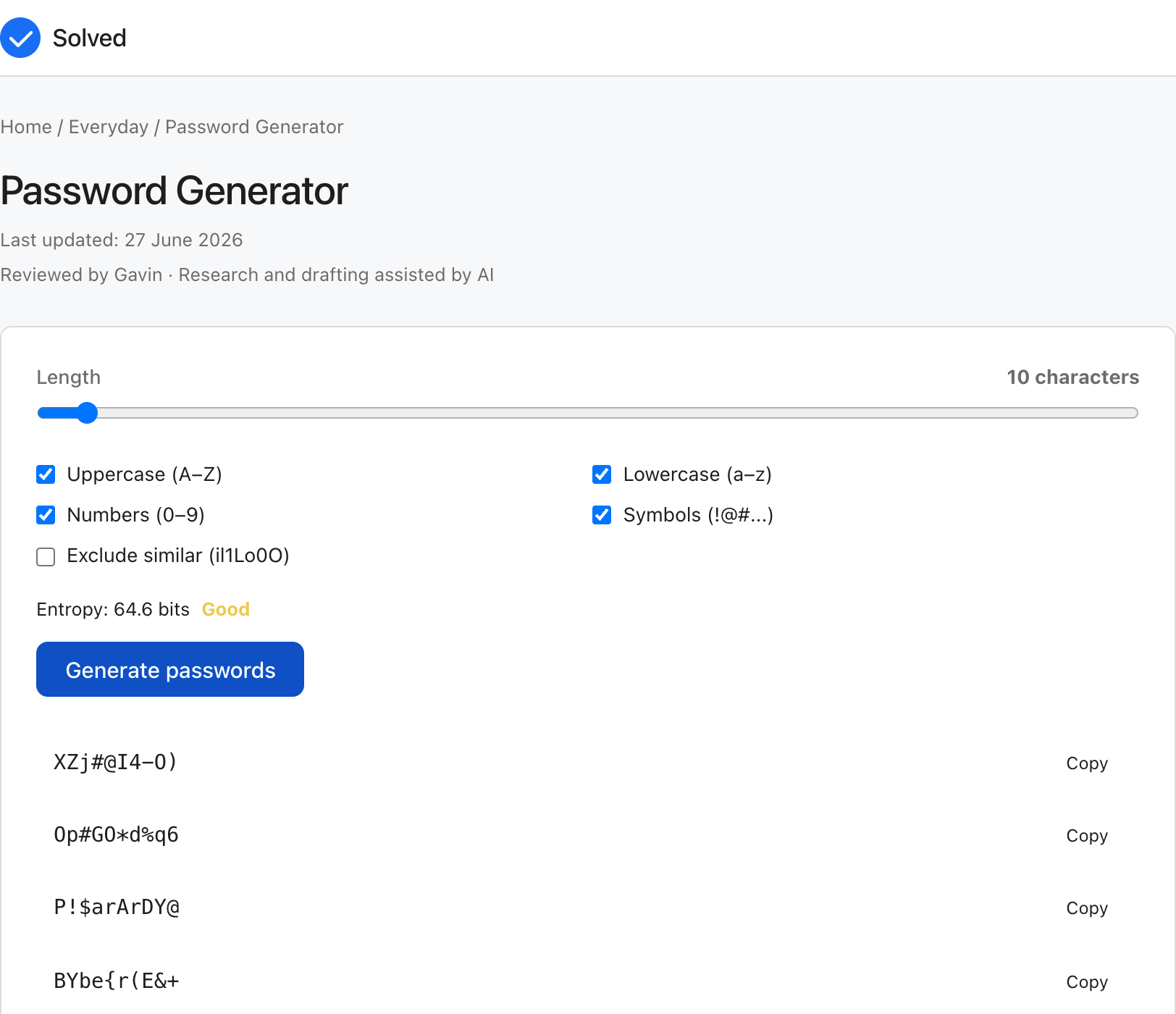
The capture below shows Password Generator after the inputs were entered, with the result on screen. Enter the same values to reproduce it.
Captured from solved.tools on 10 September 2026.
Frequently Asked Questions
How long should a password be? For most online accounts, 16 characters is the minimum recommended length. For sensitive accounts such as email, banking, and password managers, use 20 characters or more. Passwords stored with proper hashing (bcrypt or Argon2) on the server side are resistant to database breaches, but you cannot control how every site stores your credentials, so longer is always safer.
Should I use a different password for every account? Yes. Reusing passwords means a single data breach on one site exposes all your accounts. A password manager makes it practical to use a unique, randomly generated password for every account without needing to remember any of them. You only need to memorise one strong master password.
What makes a password generator secure? A secure password generator must use a cryptographically secure source of randomness (CSPRNG), such as the Web Crypto API in browsers (window.crypto.getRandomValues). Generators that use standard Math.random() are predictable and should not be used for security-sensitive passwords.
Is it safe to generate passwords in a browser? Yes, provided the tool uses the browser's built-in CSPRNG and the generation happens entirely client-side, meaning no data is sent to a server. This tool runs entirely in your browser. The generated password never leaves your device.
What each character set is worth per character
The formula above is a single multiplication, so the charset size is the only thing that varies once length is fixed. Each character you add to a password multiplies the number of possibilities by the size of the pool, which means each character is worth a fixed number of bits in every position. The table below gives that value for the five pools a generator normally offers, including the reduced pool a reader gets when the ambiguous characters are excluded.
| Character set | Pool size | Bits added by each extra character |
|---|---|---|
| Lower case letters | 26 | 4.7004 |
| Upper and lower case | 52 | 5.7004 |
| Letters and digits | 62 | 5.9542 |
| All printable ASCII, six ambiguous characters removed | 88 | 6.4594 |
| All printable ASCII | 94 | 6.5546 |
The step from 26 characters to 94 is worth 1.8542 bits per character, which sounds small and is not. Over a twelve-character password that difference compounds to 22.3 bits, which multiplies the search space by more than four million. Length and pool size both matter, and the pool size is worth less than most people assume: going from letters only to the full printable set is worth roughly one extra character every three.
How many characters each target needs
Working the formula backwards gives the shortest password that reaches a given entropy level in each pool. That is the number worth knowing when a site imposes a maximum length and you are deciding where to spend the characters.
| Character set | 64 bits | 80 bits | 128 bits | 256 bits |
|---|---|---|---|---|
| Lower case letters | 14 | 18 | 28 | 55 |
| Upper and lower case | 12 | 15 | 23 | 45 |
| Letters and digits | 11 | 14 | 22 | 43 |
| All printable ASCII, six removed | 10 | 13 | 20 | 40 |
| All printable ASCII | 10 | 13 | 20 | 40 |
Two things follow. A twenty-character password from the full printable set reaches 131.1 bits, comfortably past the 128 bit line, and dropping to the reduced set needs twenty-one characters to do the same. Second, 256 bits is out of reach for anything a person types, which is why 256 bit keys belong to machine-generated tokens rather than to account passwords.
How long a keyspace takes to search
Entropy only becomes meaningful when it is converted into time. A brute-force search has no shortcut, so the work is measured by the size of the keyspace and the speed of the attacker. The figures below assume the attacker has to search half the keyspace on average, which is the standard way to state a brute-force cost, and they use three plausible attack speeds: a single fast machine, a coordinated cluster of graphics cards, and a state-level resource.
| Entropy | One billion guesses a second | One trillion guesses a second | A hundred trillion guesses a second |
|---|---|---|---|
| 40 bits | 9.16 minutes | 0.55 seconds | 0.0055 seconds |
| 52 bits | 26.1 days | 37.5 minutes | 22.5 seconds |
| 64 bits | 292 years | 107 days | 1.07 days |
| 79 bits | 9.58 million years | 9,577 years | 96 years |
| 94 bits | 314 billion years | 314 million years | 3.14 million years |
| 128 bits | 5.39e+21 years | 5.39e+18 years | 5.39e+16 years |
| 256 bits | 1.83e+60 years | 1.83e+57 years | 1.83e+55 years |
The 64 bit row is the useful one. It falls from 292 years of work for a single machine to about a day for a very fast cluster, which shows how much the answer depends on the attacker you are assuming. Below about 60 bits the answer stops being "long enough" and becomes "already feasible": a 52 bit password falls in under a minute against the fastest column. Above about 100 bits the numbers stop being a schedule and start being a physical limit, since the arithmetic outruns the age of the universe by a margin that no foreseeable hardware closes.
Passphrases measured the same way
A word list changes the arithmetic, because words are drawn from a much smaller pool than characters. A standard list of 7,776 words, the size used by the long-running diceware method, gives each word 12.9248 bits.
| Words in the passphrase | Entropy | Keyspace |
|---|---|---|
| 3 | 38.77 bits | 4.702e+11 |
| 4 | 51.70 bits | 3.656e+15 |
| 5 | 64.62 bits | 2.843e+19 |
| 6 | 77.55 bits | 2.211e+23 |
| 7 | 90.47 bits | 1.719e+27 |
| 10 | 129.25 bits | 8.083e+38 |
A five-word passphrase carries 64.62 bits, close to the 65.55 bits of a ten-character password from the full printable set. A seven-word passphrase carries 90.47 bits, which sits between the 85.21 bits of a thirteen character password from the same pool and the 91.76 bits of a fourteen character one. The trade is memory against typing. A passphrase has to be chosen from a genuinely random selection of the list rather than assembled from words you like, because a human picking words is choosing from a much smaller pool than the list provides and the arithmetic above does not survive the substitution.
What dropping the ambiguous characters costs
Some generators let you exclude characters that look alike in print, usually the digit 0 and the capital O, the digit 1 and the lower case l, and the capital I and the lower case o. Six characters come out of a pool of 94, leaving 88.
| Setting | Pool | Bits per character | Entropy at 16 characters |
|---|---|---|---|
| Full printable set | 94 | 6.5546 | 104.9 |
| Six ambiguous characters removed | 88 | 6.4594 | 103.4 |
The cost is 1.5 bits over a sixteen-character password, which is under one and a half percent of its entropy and is the right trade for a password that will be read off a screen and typed on a phone. Reaching the same 104.9 bits from the reduced pool takes seventeen characters, so the cost is real but small. What is not a small cost is the practice of excluding characters that are merely inconvenient: every character removed from the pool lowers the value of every position in the password.
What the standards say about length
Two editions of the United States federal authentication guidelines give the clearest published position on length against complexity. NIST Special Publication 800-63B, published in June 2017 and updated in 2020, requires subscriber-chosen passwords to be at least 8 characters, recommends that systems accept at least 64, and states that verifiers are not to impose composition rules requiring mixtures of character types. Its appendix explains the reasoning: complexity rules increase user frustration, and users work around them in ways that reduce security, while blacklists, rate limiting and secure hashed storage do more against modern attacks.
NIST Special Publication 800-63-4, published on 1 August 2025, supersedes that edition and raises the bar: a password used as a single authentication factor must be at least 15 characters, a password used only as part of multi-factor authentication must be at least 8 characters, systems should support a maximum of at least 64 characters, and composition rules are again ruled out. The direction of travel in the published guidance runs from short passwords with forced character mixtures towards longer secrets, which is the same conclusion the entropy arithmetic above reaches from a different starting point.
A check on the page's own example
The worked example above uses a 20 character password from the 94 character pool and arrives at 131.1 bits. Recomputed here, 20 times log2 of 94 is 131.0918 bits, and the keyspace is 94 to the power of 20, which is 2.9011e+39. A search of half that space at a trillion guesses a second takes 4.596e+19 years. The page's figure of 131.1 bits and its conclusion both hold.
For a reader who wants to verify the tool rather than the arithmetic, the test is straightforward. Generate a 20 character password, then count the distinct character types present. If the generator is drawing from the pool you selected, a 20 character output will almost always contain all four classes. The full printable set holds 62 letters and digits against 32 symbols, so the chance of drawing twenty characters and getting no symbol at all is 0.6596 to the power of 20, which is about one in four thousand. A generator whose outputs repeatedly miss a whole character class is not using the pool it claims to use, and a generator that uses the browser's own cryptographic random source rather than a predictable pseudo-random function is the one to keep.
Also try these free tools:
References
- NIST SP 800-63B, Digital Identity Guidelines, Authentication and Lifecycle Management. https://pages.nist.gov/800-63-3/sp800-63b.html
- NIST SP 800-63B, Digital Identity Guidelines (memorised secret and entropy requirements)