Grade Calculator
Last updated: 28 June 2026
Research and drafting assisted by AI.
- The letter grade system (A, B, C, D, F) was introduced at Harvard in 1883. The 'F' was originally an 'E', but E was dropped to avoid confusion with 'Excellent'.
- The 'bell curve' grading (forced distribution) is controversial: it guarantees that a fixed percentage fail regardless of how well the class actually performed.
- In Finland, there are no standardised tests until age 16, no grade ranking until secondary school, and teachers cannot fail students in primary school. Finland consistently tops global education rankings.
Grade Calculator
A grade calculator converts raw scores, percentages, and weighted assignments into a final course grade. It is used by students, teachers, and parents to track academic performance, understand what score is needed on upcoming assessments, and project end-of-term results.
How to Use the Grade Calculator
- List each assignment, test, or assessment category (e.g., homework, midterm, final exam).
- Enter the weight of each category as a percentage (all weights must sum to 100%).
- Enter your score and the maximum possible score for each item, or enter your percentage directly.
- Click "Calculate" to see your current weighted grade and letter grade equivalent.
- Use the "What do I need?" feature to find the score required on remaining assessments to hit your target grade.
The Formula
Most courses use a weighted average, where different components contribute different proportions to the final grade.
Weighted Grade = Sum of (Category Weight x Category Score) / Sum of Weights
Where each category score is expressed as a decimal (e.g., 85% = 0.85).
If all categories have equal weight, this simplifies to a simple average:
Simple Average = Sum of All Scores / Number of Assessments
"what score do I need?" calculation:
Required Score = (Target Grade - Current Weighted Grade x Completed Weight) / Remaining Weight
Where all values are expressed as decimals and Completed Weight + Remaining Weight = 1.0 (100%).
Letter grade thresholds vary by institution, but the most common US/UK scale is:
- A: 90-100%
- B: 80-89%
- C: 70-79%
- D: 60-69%
- F: below 60%
Real-World Example
A student's course is structured as follows:
- Homework: 20% weight, average score 92%
- Midterm exam: 30% weight, score 78%
- Final exam: 50% weight, not yet taken
Current weighted grade (from completed work):
- Homework: 0.20 x 92 = 18.4
- Midterm: 0.30 x 78 = 23.4
- Total so far: 41.8 points out of 50 possible (50% of the weight is done)
The student wants a final grade of 85% (B). What score do they need on the final exam?
Required Score = (85 - 41.8) / 50 = 43.2 / 50 = 86.4%
The student needs a score of 86.4% or higher on the final exam to achieve an overall grade of 85%.
Understanding Grade Weighting
The weight assigned to each assessment reflects its importance in the course. A heavily weighted final exam (50%+) can significantly raise or lower a grade regardless of earlier performance. Assignments with low weight (5-10%) have minimal individual impact, but collectively they add up. Some instructors use a points-based system rather than weights; in that case, simply divide your total earned points by the total possible points to get your percentage. Understanding your course's weighting structure early in the term lets you prioritise effort strategically, focusing more energy on high-value assessments rather than treating every task equally.
Reference Table: Weighted grade worked through
A course with five weighted components. The final column is weight multiplied by score, and those products add to 83.9 out of 100, so the course grade is 83.9%. Holding the first four components fixed, a 90% final would lift the total to 85.9%.
| Component | Weight | Your score | Weighted points |
|---|---|---|---|
| Homework | 20% | 88% | 17.6 |
| Quizzes | 15% | 92% | 13.8 |
| Midterm | 25% | 78% | 19.5 |
| Final project | 20% | 85% | 17.0 |
| Final exam | 20% | 80% | 16.0 |
Worked Example on Screen
The capture below shows Grade Calculator after the inputs were entered, with the result on screen. Enter the same values to reproduce it.
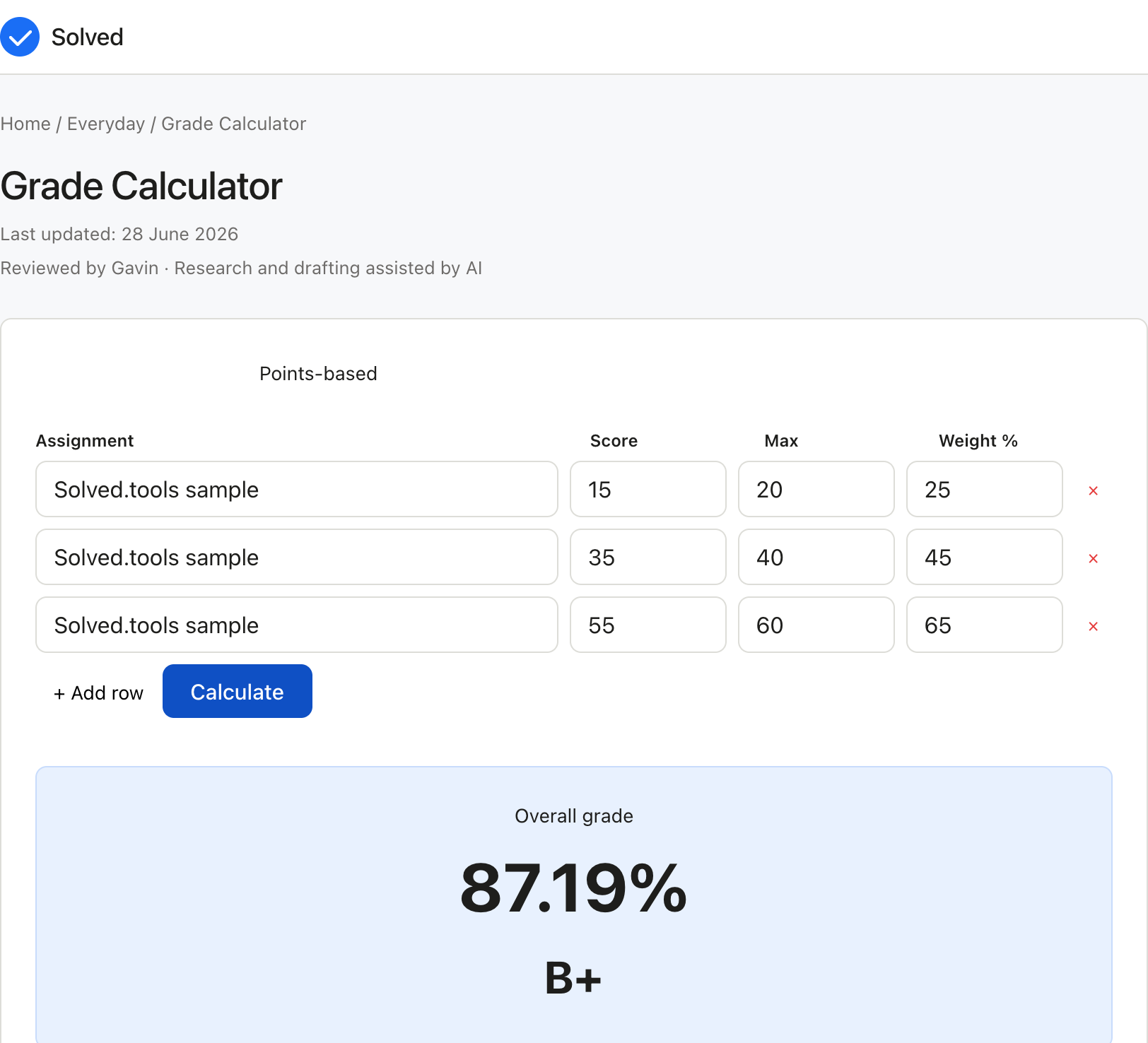
Captured from solved.tools on 10 September 2026.
Frequently Asked Questions
What if my course uses a different grading scale? Many international and postgraduate courses use different scales. UK A-levels and university degrees use percentages with letter grades starting at different thresholds. Some courses use plus/minus grading (A+, A, A-, B+, etc.). Enter the percentage value your institution uses for each letter grade to ensure the calculator reflects your actual grading system.
Can I use this to calculate my GPA as well? This tool calculates your percentage grade and letter grade for a single course. To convert course grades into a GPA, use the GPA calculator, which applies grade point values and credit-hour weighting across multiple courses.
What happens if I miss an assignment? A missed assignment typically scores zero for that item. Enter 0 as your score for missed work to see the true impact on your grade. Some instructors drop the lowest score; if so, exclude the worst-scoring assignment from your calculation.
How accurate is the "what score do I need?" calculation? It is mathematically precise given the inputs, but depends on the course structure being exactly as entered. If your instructor adjusts weights, adds extra credit, or curves grades, the required score will differ. Always confirm your course syllabus and check with your instructor if your calculated required score seems impossibly high.
Common Inputs and How to Choose Them
Most Grade Calculator problems revolve around a small set of inputs.
List each assignment, test, or assessment category (e.g., homework, midterm, final exam) is usually the first value to pin down for the Grade Calculator.
the weight of each category as a percentage (all weights must sum to 100%) sets the context the Grade Calculator needs for a sensible result.
your score and the maximum possible score for each item, or enter your percentage directly refines the Grade Calculator output where the data is available. Identifying the right values is the most important step for the Grade Calculator, because the answer is only as accurate as the data you put in. If a value is unknown, prefer a conservative estimate over a guess when using the Grade Calculator.## How to Interpret the Result The numerical answer from the Grade Calculator alone is rarely the whole story. Read the units, the precision, and any warnings shown alongside the Grade Calculator result. Understanding the path from inputs to output in the Grade Calculator makes it easier to spot errors, communicate the result to others, and reuse the method for related problems in the future.## Worked Examples A typical Grade Calculator run takes reasonable inputs, produces a sensible answer, and returns it in a single click. Example: A student's course is structured as follows: - Homework: 20% weight, average score 92% - Midterm exam: 30% weight, score 78% - Final exam: 50% weight, not yet taken Current weighted grade (from completed work): - Homework: 0.20 x 92 = 18.4 - Midterm: 0.30 x 78 = 23.4 - Total so far: 41.8 points out of 50 possible (50% of the weight is done) The student wants a final grade of 85% (B). What score do## Common Mistakes to Avoid Common mistakes with the Grade Calculator:
Mixing up units (for example, entering one unit when the Grade Calculator expects another).
Forgetting to convert percentages to decimals or vice versa where the Grade Calculator formula requires it.
Using a snapshot value that no longer reflects reality for the Grade Calculator, especially for time-sensitive inputs like prices, rates, or counts.
Rounding intermediate steps too early and then carrying the rounded value forward in the Grade Calculator.
Treating the Grade Calculator as a substitute for professional advice when the decision is high-stakes.## Limitations and Assumptions No calculator is a perfect model of reality, and the Grade Calculator is no exception. The Grade Calculator makes simplifying assumptions to keep the math tractable: it ignores rare cases, applies default values where inputs are missing, and uses formulas that suit the typical situation rather than the exotic one. When your situation falls outside the typical case, the Grade Calculator result may drift further from the truth. If you need a more precise answer than the Grade Calculator provides, the next step is usually a specialist, a more detailed reference, or a domain-specific tool.## Related Tools and References For more depth on the Grade Calculator topic, consult textbooks, academic papers, or reputable online resources. Reputable sources for the Grade Calculator include government statistics agencies, university extension services, and peer-reviewed journals. Wikipedia is a useful starting point for definitions and formulas behind the Grade Calculator, but always follow the citations to the original source before relying on a number. If you find that you need the same Grade Calculator calculation repeatedly, consider writing down the inputs and the result in a note so you can build a personal record over time.## Quick Reference
Free to use: yes, no sign-up required.
Privacy: all calculations run locally in your browser.
Units: metric and imperial supported where applicable; check the input labels.
Speed: instant, no page reload.
Mobile friendly: yes, works on phones and tablets.
Offline: once the page has loaded, the calculation continues to work without a network connection.## References
Wolfram MathWorld. https://mathworld.wolfram.com/
National Center for Education Statistics (U.S. Department of Education), "NCES". https://nces.ed.gov/