Amortisation Calculator
Last updated: 27 June 2026
Research and drafting assisted by AI.
- On a 25-year mortgage, over half of your total interest is paid in the first 10 years. This is why overpaying early has such a dramatic effect on total cost.
- The word 'amortize' comes from the Latin 'ad mortem' , meaning 'to the death'. It refers to the gradual killing off of a debt.
- A $200,000 mortgage at 5% over 25 years costs $116,000 in interest alone , meaning you pay back more than double the original loan.
Amortization Calculator
An amortization calculator breaks down every scheduled payment on a loan into its interest and principal components, showing exactly how the balance reduces over time. It is used by borrowers who want to understand their loan repayment schedule, track overpayments, or compare the cost of different loan terms.
How to Use the Amortization Calculator
- Enter the loan amount (principal).
- Enter the annual interest rate.
- Set the loan term in months or years.
- Click calculate to generate a full amortization schedule.
- Review the table showing the payment date, interest paid, principal paid, and remaining balance for each period.
The Formula
Each monthly payment M is calculated using the standard annuity formula:
M = P x (r(1 + r)^n) / ((1 + r)^n - 1)
Where P is the principal, r is the monthly interest rate (annual rate divided by 12), and n is the total number of payments. For each period, the interest portion is the remaining balance multiplied by the monthly rate, and the principal portion is M minus that interest. The remaining balance after each payment equals the previous balance minus the principal portion paid.
Real-World Example
You take a $15,000 car loan at 5% annual interest over 4 years (48 months).
- Monthly rate: 5% / 12 = 0.4167%, or 0.004167
- Monthly payment: 15,000 x (0.004167 x (1.004167)^48) / ((1.004167)^48 - 1) = approximately $345
first payment:
- Interest portion: $15,000 x 0.004167 = $62.50
- Principal portion: $345 - $62.50 = $282.50
- Remaining balance: $15,000 - $282.50 = $14,717.50
By month 48, nearly the entire payment is principal and almost none is interest. Over the 4 years, total interest paid is approximately $1,560.
Understanding the Amortization Schedule
In the early months of a loan, most of your payment goes towards interest rather than reducing the balance. This is because interest is calculated on the outstanding principal, which is highest at the start. As you pay down the balance, the interest portion of each payment shrinks and the principal portion grows. This is why making even small overpayments early in a loan has a disproportionate effect; you reduce the principal faster, which cuts the interest calculated in all future periods. The amortization schedule makes this visible, so you can see exactly how much each extra payment saves in interest and how many months it removes from the loan.
Why Overpayments Are Powerful
Consider a $200,000 mortgage at 4% interest over 25 years. The monthly payment is around $1,056. Adding $200 per month as an overpayment reduces the loan term by several years and saves thousands of dollars in interest over the remaining life of the loan. The exact savings depend on the loan balance, the rate, and the timing, but the principle is always the same: reducing principal faster reduces future interest in every subsequent period.
The amortization calculator can show this directly by simulating extra monthly payments or a one-time lump sum. Most calculators allow you to add overpayments at any specific month or month range, and they will recompute the schedule with the new ending balance and total interest.
Fixed-Rate vs Variable-Rate Loans
The amortization formula assumes a fixed interest rate. For variable-rate loans or tracker mortgages, the payment or balance changes as the rate changes, and the amortization schedule is more complex. Many calculators allow you to model one or more rate changes, showing how the payment, term, or total interest changes in response.
For adjustable-rate mortgages, the schedule becomes a projection rather than a firm commitment, since future rates are unknown. Even so, the calculator is useful for stress-testing scenarios, what happens to my payment if rates rise by 1%, 2%, or 3%?
Common Pitfalls When Reading Schedules
A few common misunderstandings lead to incorrect conclusions about amortization:
- Looking at the interest portion of any single payment in isolation. The schedule is a sequence; what matters is the cumulative total.
- Assuming that making payments twice a month rather than once a month halves the interest. The savings come from paying down principal faster, which happens only if the total annual payment is higher, not just split differently.
- Confusing the amortization schedule with the cash flow. The schedule assumes perfect punctual payments; missed or late payments change the totals and may add fees.
Reference Table: Principal and interest split by year
A $250,000 mortgage at 6% over 30 years, totalling each year of the schedule. Early years are mostly interest: year 1 pays $14,916 in interest against $3,070 of principal. The balance passes halfway at about year 21.
| Year | Principal repaid | Interest paid | Balance at year end |
|---|---|---|---|
| Year 1 | $3,070 | $14,916 | $246,930 |
| Year 2 | $3,259 | $14,727 | $243,671 |
| Year 5 | $3,900 | $14,086 | $232,636 |
| Year 10 | $5,261 | $12,725 | $209,214 |
| Year 15 | $7,096 | $10,890 | $177,622 |
| Year 20 | $9,572 | $8,414 | $135,009 |
| Year 25 | $12,911 | $5,075 | $77,530 |
| Year 30 | $17,415 | $571 | $0 |
Worked Example on Screen
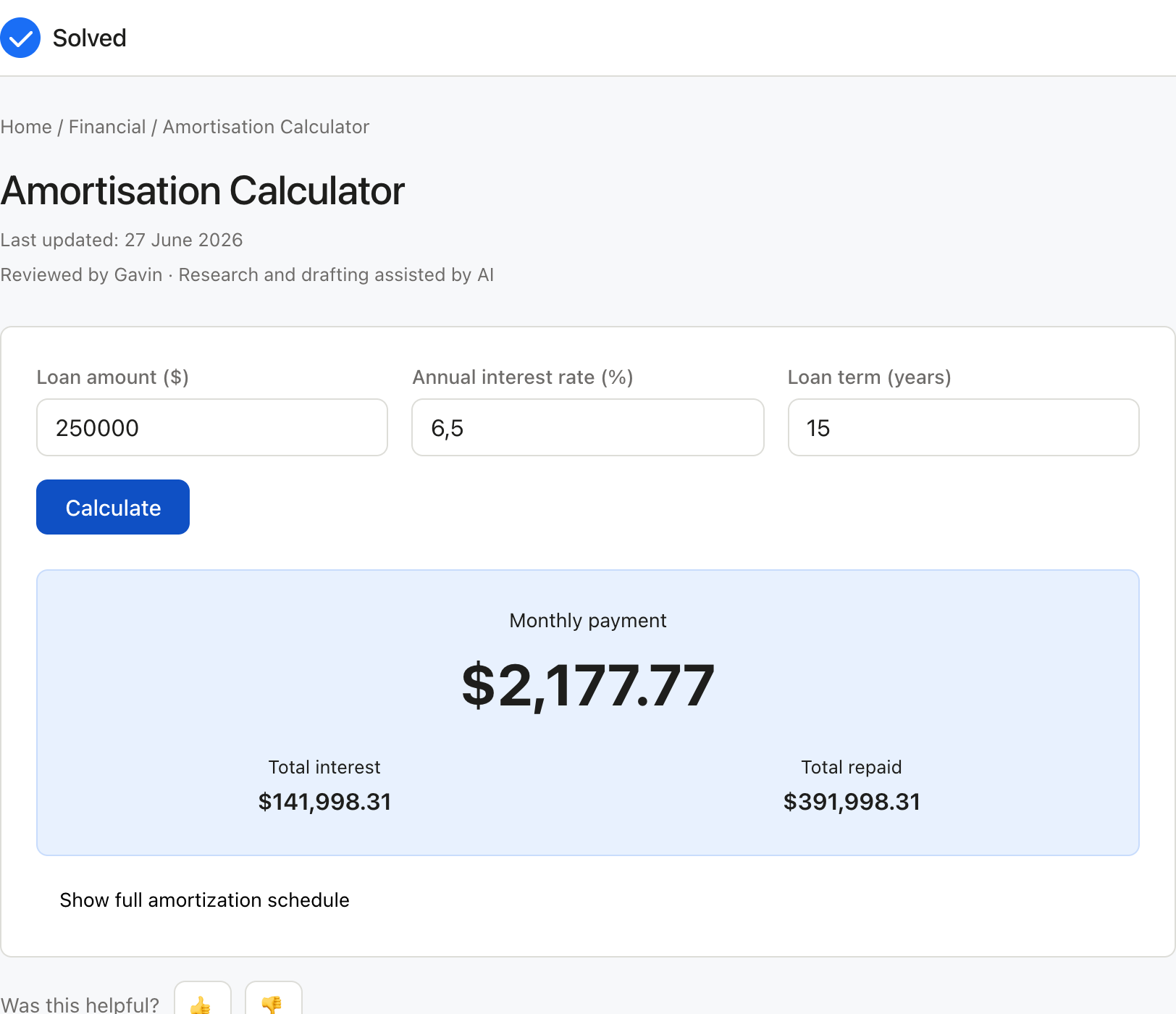
The capture below shows Amortisation Calculator after the inputs were entered, with the result on screen. Enter the same values to reproduce it.
Captured from solved.tools on 10 September 2026.
Frequently Asked Questions
What happens if I make an overpayment on a loan? Overpayments reduce the outstanding principal directly, which lowers future interest charges and shortens the loan term. Most personal loans in the UK allow overpayments, though some charge an early repayment fee equivalent to one or two months of interest. Check your loan agreement before making extra payments.
Can I use an amortization schedule for a mortgage? Yes. The same formula applies to mortgages. A mortgage amortization schedule is especially useful for planning overpayments, since mortgage balances are large and even small reductions in the principal early on can save thousands of dollars in interest over a 25-year term.
Why does my balance barely seem to reduce in the first few years? This is the natural result of how amortization works. On a long-term loan or mortgage, the interest charge in the early years consumes the majority of each payment. The balance falls slowly at first and then accelerates as the loan matures and the interest portion shrinks. The schedule makes this pattern easy to see.
How is an amortization schedule different from a simple repayment plan? A simple repayment plan shows only the fixed monthly payment. An amortization schedule breaks each payment into interest and principal, shows the running balance after every payment, and totals all interest paid over the life of the loan. This level of detail helps you plan overpayments and understand the true cost of borrowing.
Can I include extra payments in the schedule? Yes. Most amortization calculators allow optional extra payments, either as a fixed amount added to each monthly payment or as one-off lump sums at specific dates. The schedule then reflects the reduced balance and shortened term, including the total interest saved.
How does the loan term affect the total interest paid? Even a small change in term has a large effect on total interest. A 30-year mortgage at 4% on $200,000 pays more than twice the total interest of a 15-year mortgage at the same rate, because the slower principal repayment leaves a higher balance earning interest for longer. Shorter terms mean higher monthly payments but dramatically lower lifetime interest.
Can I export the amortization schedule? Most online calculators offer CSV or PDF export. A spreadsheet export is useful for further analysis, opening the data in Excel or Google Sheets to build custom reports, pivot tables, or graphs. A PDF export is useful for client reports or loan documentation.
Does the calculator work for interest-only loans? Interest-only loans require a different schedule, because the principal never amortises during the interest-only period. Most amortization calculators either refuse these inputs or include a separate mode for interest-only periods with a balloon payment at the end.
Inputs and Their Effects
Each field on the Amortization Calculator form plays a distinct part in the calculation.
- the loan amount (principal) - this value feeds the Amortization Calculator directly and shows up in the result.
- the annual interest rate - this value feeds the Amortization Calculator directly and shows up in the result.
- the loan term in months or years - this value feeds the Amortization Calculator directly and shows up in the result. Editing one field of the Amortization Calculator changes the output in line with the formula, so a misplaced value is visible in the answer.
Common Mistakes to Avoid
The errors that come up most often with the Amortization Calculator are easy to spot once you know them:
- Entering a value in the wrong unit for the loan amount (principal); the Amortization Calculator answer is only right when the unit matches the label.
- Mixing conventions, such as percentages and decimals, where the Amortization Calculator formula expects one form.
- Rounding the inputs before the Amortization Calculator runs; keep the full values and let the tool round the final answer.
- Treating the Amortization Calculator result as exact when the inputs themselves were estimates.
When to Use the Amortization Calculator
Use the Amortization Calculator whenever you need a quick, reliable answer that fits the tool's scope. Common situations for the Amortization Calculator include homework and study, on-the-job quick checks, sanity-checking a more complex calculation, or exploring a scenario for personal interest. If the Amortization Calculator answer will be used for a decision that has legal, medical, or financial consequences, treat the result as a starting point and verify it with a qualified professional.
How the Math Works
The calculation behind the Amortization Calculator follows the standard form for this kind of problem: Each monthly payment M is calculated using the standard annuity formula: M = P x (r(1 + r)^n) / ((1 + r)^n - 1) Where P is the principal, r is the monthly interest rate (annual rate divided by 12), and n is the total number of payments. For The Amortization Calculator applies that relationship in the order the algebra prescribes, converting inputs to consistent units first where the formula needs them.
Practical Tips
A few habits keep the Amortization Calculator results reliable:
- Confirm each input matches the label, especially the loan amount (principal) and the annual interest rate if both are present.
- Work in one unit system throughout the Amortization Calculator instead of converting mid-way by hand.
- Sanity-check the Amortization Calculator output against a rough estimate before relying on it.
- Keep a note of the values you used so the Amortization Calculator calculation can be reproduced later.
Worked Examples and Edge Cases
Beyond the worked examples earlier in this page, a few additional cases illustrate how the Amortization Calculator behaves at the edges of its input range.
Boundary inputs. Entering the smallest or largest sensible value for a numeric input in the Amortization Calculator should produce a result at the corresponding end of the output range, not a runaway value or a silently clipped result.
Equal inputs. When two inputs that should be different are set to the same value, the Amortization Calculator result should be the well-defined value the formula produces for that degenerate case.
Non-numeric inputs. Text in a numeric field of the Amortization Calculator is ignored by the parser and treated as zero.
can the Amortization Calculator be used for professional or commercial purposes? yes, the Amortization Calculator The Amortization Calculator provides mathematically correct results that are suitable for professional, commercial, and educational use. the Amortization Calculator formulas used are well-established and validated against reference standards.
**How often are the formulas behind the Amortization Calculator updated? When standards change (e.g., new physical constants, revised tax brackets, updated standards), the Amortization Calculator is updated to reflect the current authoritative source. Each calculator's references section, including the Amortization Calculator, lists the specific sources used.tools/tools/loan-calculator)
References
- Internal Revenue Service, US federal tax guidance. https://www.irs.gov/
- US Securities and Exchange Commission, Investor.gov. https://www.investor.gov/
- Financial Conduct Authority, UK. https://www.fca.org.uk/