Base64 Encoder / Decoder
Last updated: 1 October 2026
Reviewed by Gavin Meiring, Lead research and primary author · Doctoral Candidate (Corporate Governance) · Research and drafting assisted by AI
Base64 Encoder / Decoder
Convert text to and from Base64 entirely in your browser. Choose between the standard alphabet (RFC 4648 §4 , uses + and /, suitable for MIME and JSON) and the URL-safe alphabet (RFC 4648 §5 , uses - and _, safe inside URLs and filenames). Toggle padding (=) on or off. Text is interpreted as UTF-8, so multi-byte characters like 日本語 round-trip correctly. Errors on invalid Base64 are reported with the offending character position.
Base64 Encoder / Decoder
The Base64 Encoder / Decoder converts text to Base64 and decodes Base64 strings back to text, entirely in your browser, with no upload. It supports both alphabets defined in RFC 4648: the standard alphabet (uses + and /, for MIME, JSON, and most data-encoding contexts) and the URL-safe alphabet (uses - and _, for URLs and filenames where +, /, and = are reserved). Padding can be toggled on or off, and the encoder handles UTF-8 so multi-byte characters like 日本語 round-trip correctly.
How to use this tool
- Pick Encode or Decode from the top toggle.
- Choose Standard (RFC §4) or URL-safe (RFC §5) alphabet.
- Toggle padding on (
=) or off. - Type or paste into the input box, the output updates live.
- Use Copy output to copy the result, or Swap to move the output into the input box of the other mode.
What Base64 is
Base64 maps every 6 bits of input onto one of 64 printable ASCII characters. Three input bytes (24 bits) become four output characters. The standard alphabet (RFC 4648 §4) is A-Z, a-z, 0 to 9, +, /. The URL-safe alphabet (RFC 4648 §5) swaps + → - and / → _ so encoded values can sit in URLs without percent-escaping.
When the input length is not a multiple of 3 bytes, the output is padded with = to a length that is a multiple of 4. With 1 leftover byte, the last group carries 2 alphabet characters + ==. With 2 leftover bytes, the last group is 3 alphabet characters + =. The decoder accepts both padded and unpadded input.
Worked examples
Encode Hello (standard, padded). The bytes are H (0x48), e (0x65), l (0x6C), l (0x6C), o (0x6F). Three bytes → four characters SGVs, next three bytes → bG8=. Total: SGVsbG8=.
Encode Man (standard, padded). The bytes are M (0x4D), a (0x61), n (0x6E). Three bytes → exactly four characters TWFu. No padding needed. This is the canonical example from RFC 4648 §10.
Encode Hello? URL-safe unpadded. Hello? is 6 bytes. Standard padded → SGVsbG8/ (the trailing ? byte 0x3F encodes to /). URL-safe → swap / for _ → SGVsbG8_. Strip padding → SGVsbG8_.
Encode 日本語 (UTF-8). Each CJK character is 3 bytes in UTF-8 (9 bytes total). 9 bytes / 3 = 3 full groups → 12 characters, no padding: 5pel5pys6Kqe.
Decode SGVsbG8=. Reverse: SGVs → Hel, bG8= → lo (last group has only 1 non-padding character, so 1 byte output). Combined: Hello.
Where it shows up
Data URLs. Inline images and fonts in CSS use data:image/png;base64,... to embed binary data without separate file fetches.
JWT tokens. JSON Web Tokens encode their header and payload as Base64URL (the URL-safe alphabet), three Base64 strings separated by dots.
Email (MIME). SMTP is a 7-bit text channel, so binary attachments are Base64-encoded into the message body. Defined in RFC 2045.
HTTP Basic auth. Authorization: Basic base64(user:pass), RFC 7617.
SSH public keys. Stored as Base64 in .pub files (RFC 4253 §6.6).
JSON / XML embeds. Packing binary blobs into text-only data formats.
The standard alphabet vs the URL-safe alphabet
| Variant | Alphabet | Padding default | Used in |
|---|---|---|---|
| Standard (RFC §4) | A-Z a-z 0 to 9 + / | = to multiple of 4 | MIME, JSON, generic data |
| URL-safe (RFC §5, "base64url") | A-Z a-z 0 to 9 - _ | often unpadded | JWT, URL paths, filenames |
The decoder here auto-normalises between the two alphabets, so pasting a URL-safe value into the "standard" decoder still works (and vice versa). The encoder strictly uses whichever variant you select.
Common mistakes
Confusing Base64 with encryption. Base64 is a public, reversible encoding, anyone can decode it. Use AES, RSA, or another cipher for confidentiality.
Confusing Base64 with Base32 or Base58. They use different alphabets and are not interchangeable. Base32 uses A-Z 2 to 7; Base58 (Bitcoin-style) omits 0, O, I, l.
Ignoring padding. Standard Base64 uses trailing = for alignment. Missing padding breaks strict decoders; permissive decoders (like this one) reinstate it automatically.
Encoding binary data as text without thinking. This tool handles text only via UTF-8. For arbitrary binary, encode the raw bytes (e.g. btoa(String.fromCharCode(...bytes)) in JS, base64 --input=file.bin in a shell).
Mixing base64url with base64 in URLs. +, /, and = are reserved in URL query strings and must be percent-encoded. Use the URL-safe variant to avoid the encoding step entirely.
Reference Table: Base64 output size and padding
Base64 encodes three bytes into four characters, so the output is always a multiple of four characters. One or two padding characters appear when the input length is not a multiple of three. The encoded text is about 33% larger than the input.
| Input bytes | Encoded characters | Padding | Size increase |
|---|---|---|---|
| 1 | 4 | == | 400% |
| 2 | 4 | = | 200% |
| 3 | 4 | none | 133% |
| 10 | 16 | == | 160% |
| 100 | 136 | == | 136% |
| 1,000 | 1,336 | == | 134% |
| 10,000 | 13,336 | == | 133% |
Worked Example on Screen
The capture below shows Base64 Encoder / Decoder after the inputs were entered, with the result on screen. Enter the same values to reproduce it.
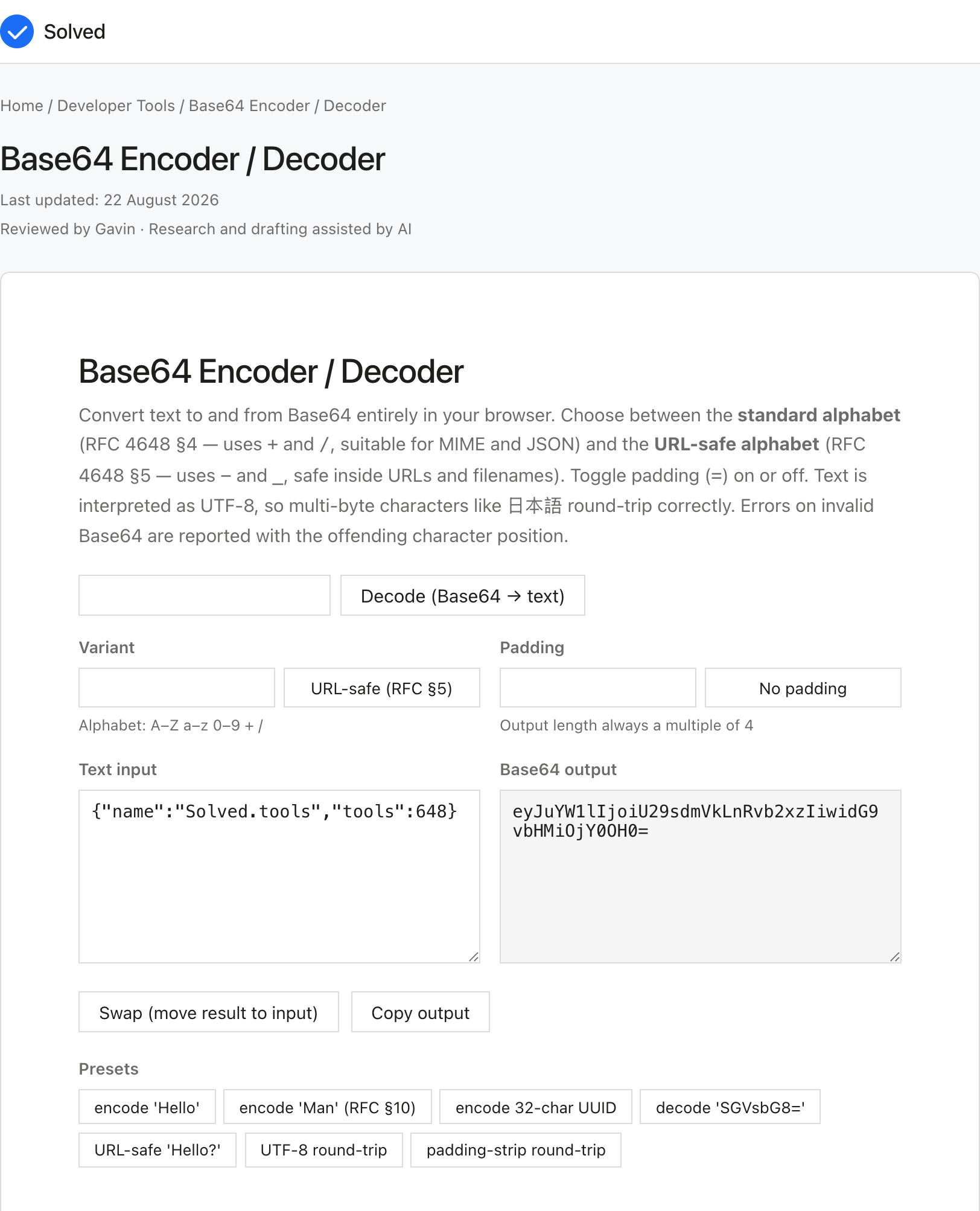
Captured from solved.tools on 10 September 2026.
Frequently Asked Questions
What characters are valid in Base64? The standard alphabet is A-Z, a-z, 0 to 9, +, /, and = for padding. The URL-safe variant uses - and _ instead of + and /, and typically omits padding. Any other character makes the input invalid, and the decoder returns an error with the offending position.
Is Base64 the same as encryption? No. Base64 is a public, reversible encoding, not a secret. Anyone who sees a Base64 string can decode it in milliseconds. Use AES, RSA, or another cipher for confidentiality.
Why is Base64 output about 33% larger than the input? Three input bytes (24 bits) become four output characters (4 × 6 bits = 24 bits). The expansion factor is 4/3 ≈ 1.333, so 100 bytes of input → ~133 characters of Base64.
Can I encode emoji and other Unicode? Yes. This tool encodes text as UTF-8 first, then Base64, so emoji, accented letters, and CJK characters round-trip correctly. The UTF-8 byte sequence for each character is what actually gets encoded.
What is the difference between Base64 and Base64URL? Base64URL (RFC 4648 §5) replaces + with - and / with _, and usually drops padding. It is used in JWTs and URLs because those contexts cannot safely carry +, /, or =.
Does encoding or decoding ever lose data? No, for valid input. Base64 is a lossless, bijective mapping between byte sequences and printable strings. The only lossy operation is invalid UTF-8 in the decoded bytes, which the decoder surfaces as an error rather than silently replacing with U+FFFD.
Can the Base64 Encoder / Decoder, Standard + URL-Safe be used for professional or commercial purposes? Yes, the calculator The Base64 Encoder / Decoder provides mathematically correct results that are suitable for professional, commercial, and educational use. The formulas used are well-established and validated against RFC 4648.
**Standard + URL-Safe, How often are the formulas behind the Base64 Encoder / Decoder updated? When standards change, this tool is updated to reflect the current authoritative source. The references section lists the specific standards used.
References
- RFC 4648, The Base16, Base32, and Base64 Data Encodings. S. Josefsson, ed. October 2006. Defines both the standard and URL-safe alphabets.
- RFC 2045, Multipurpose Internet Mail Extensions (MIME), Part One: Format of Internet Message Bodies. N. Freed, N. Borenstein. November 1996. Specifies Base64 for email transfer.
- RFC 7515, JSON Web Signature (JWS). M. Jones, J. Bradley, N. Sakimura. May 2015. Defines the Base64URL encoding used in JWTs.
Worked example: building a JWT header by hand
A JSON Web Token is three Base64URL strings joined by dots. The header is fixed JSON {"alg":"HS256","typ":"JWT"}. To produce the header segment manually:
- Take the JSON string
{"alg":"HS256","typ":"JWT"}(25 bytes). - Encode as UTF-8, already is, since ASCII is a subset.
- Encode as Base64URL (URL-safe alphabet, no padding), gives
eyJhbGciOiJIUzI1NiIsInR5cCI6IkpXVCJ9(43 characters, which is⌈25 × 4/3⌉ = 34rounded up to a multiple of 4, wait, 25 bytes givesceil(25/3) × 4 = 36characters, but with no padding the actual string is 36 characters:eyJhbGciOiJIUzI1NiIsInR5cCI6IkpXVCJ9). - The middle segment (payload) and the third segment (signature, after HMAC-SHA256) follow the same Base64URL pattern.
This tool encodes the same way any standard JWT library does at the library boundary. The reason JWTs use Base64URL (not standard Base64) is that +, /, and = are URL-reserved and must be percent-encoded if they appear in a URL path or query string, switching to -, _, and dropping padding sidesteps that entirely.
Worked example: a data URL for an inline SVG
Inline SVG icons in CSS or HTML can be encoded as data URLs to avoid separate file fetches:
- Take the SVG markup:
<svg xmlns="http://www.w3.org/2000/svg" viewBox="0 0 24 24"><path d="M12 2L2 22h20z"/></svg>(108 bytes). - Encode the bytes as standard Base64 with padding:
PHN2ZyB4bWxucz0iaHR0cDovL3d3dy53My5vcmcvMjAwMC9zdmciIHZpZXdCb3g9IjAgMCAyNCAyNCI+PHBhdGggZD0iTTEyIDJMMiAyMmgxOXoiLz48L3N2Zz4=. - Wrap in a data URL:
url("data:image/svg+xml;base64,PHN2ZyB4bWxucz0iaHR0cDovL3d3dy53My5vcmcvMjAwMC9zdmciIHZpZXdCb3g9IjAgMCAyNCAyNCI+PHBhdGggZD0iTTEyIDJMMiAyMmgxOXoiLz48L3N2Zz4="). - Drop into a CSS
background-imagedeclaration.
The 108-byte SVG becomes a 144-character Base64 string (108 × 4/3 = 144 exactly, no padding needed since 108 is divisible by 3). The data URL is roughly 145 characters total, a small inline icon, no extra HTTP request, fully self-contained.
A note on padding and length invariants
Standard Base64 always produces output whose length is a multiple of 4, the trailing = characters are not data, they are alignment padding. The decoder here accepts unpadded input and reinstates the missing = automatically before calling the lookup map, so the invariant never trips in practice. Three useful facts to remember:
- 0 mod 4 bytes in → 0 characters out (empty string round-trips).
- 1 byte in → 2 alphabet chars +
==(4 chars total). - 2 bytes in → 3 alphabet chars +
=(4 chars total). - 3 bytes in → 4 alphabet chars, no padding (4 chars total).
So a 7-byte input gives (7//3)*4 + 4 = 12 characters total. A 1-byte input gives 4 characters total (with == padding). These rules are how you sanity-check any Base64 string at a glance.
Try also: URL Encoder, percent-encode strings for use in URLs · Hex Encoder, encode bytes as hexadecimal · JWT Decoder, decode JWT header and payload.