Regex Tester
Last updated: 27 June 2026
Reviewed by Gavin Meiring, Lead research and primary author · Doctoral Candidate (Corporate Governance) · Research and drafting assisted by AI
Quick reference
.any character (except newline)\ddigit [0-9]\wword char [a-zA-Z0-9_]\swhitespace^start of string$end of string*0 or more+1 or more?0 or 1{n,m}between n and m[abc]character class(abc)capture group(?:abc)non-capture groupa|ba or b- Regular expressions were first described by mathematician Stephen Kleene in 1951. The * in regex (meaning 'zero or more') is still called the 'Kleene star'.
- The now-famous programmer quip: 'Some people, when confronted with a problem, think: I know, I'll use regular expressions. Now they have two problems.' — Jamie Zawinski, 1997.
- The most complex real-world regex is probably email validation. The official RFC 5322 specification, written as a regex, is several thousand characters long.
Regex Tester
A regex tester lets you write and test regular expressions against sample text in real time, highlighting matches and showing capture groups. It is used by developers, data engineers, and system administrators who need to validate, extract, or convert text using pattern matching without running code.
How to Use the Regex Tester
- Enter your regular expression pattern in the pattern field (without surrounding delimiters unless the tool requires them).
- Set any flags you need, such as global (g), case-insensitive (i), or multiline (m).
- Paste your test string into the text area.
- The tool highlights all matches in real time and lists any capture groups.
- Adjust the pattern until you achieve the desired matches, then copy the verified regex for use in your code.
The Formula
Regular expressions are a formal language for describing string patterns, based on the theory of finite automata. A regex engine reads the pattern and compiles it into a state machine that processes the input string character by character. Key syntax elements:
.matches any single character except a newline.*matches zero or more of the preceding element.+matches one or more of the preceding element.?makes the preceding element optional (zero or one).^asserts the start of a line;$asserts the end.[abc]matches any single character in the set;[^abc]matches any character not in the set.\dmatches any digit;\wmatches any word character (letters, digits, underscore);\smatches any whitespace.(...)creates a capture group;(?:...)creates a non-capturing group.{n,m}matches between n and m repetitions of the preceding element.
Most tools support PCRE (Perl Compatible Regular Expressions) or the ECMAScript regex standard used in JavaScript.
Real-World Example
You need to extract all email addresses from a block of text. You write the pattern:
[a-zA-Z0-9._%+\-]+@[a-zA-Z0-9.\-]+\.[a-zA-Z]{2,}
Pasting sample text containing "Contact us at support@example.com or sales@company.co.uk for help." into the tester highlights both email addresses. The pattern matches one or more valid characters before the @ symbol, a domain name, a dot, and a top-level domain of at least two characters. You confirm the pattern works on edge cases and copy it into your Python or JavaScript code.
Common Regex Patterns Reference
Some patterns that developers use frequently:
- Email:
[a-zA-Z0-9._%+\-]+@[a-zA-Z0-9.\-]+\.[a-zA-Z]{2,} - UK postcode:
[A-Z]{1,2}[0-9][0-9A-Z]?\s?[0-9][A-Z]{2} - ISO date (YYYY-MM-DD):
\d{4}-\d{2}-\d{2} - URL:
https?://[^\s]+ - IPv4 address:
\b(?:\d{1,3}\.){3}\d{1,3}\b
Reference Table: Regular expression token reference
The tokens that cover most everyday patterns. Anchors matter: without them a pattern matches anywhere in the string, which is the usual cause of a rule that is too permissive. Quantifiers are greedy by default, so add ? after one to make it stop at the first match.
| Token | Meaning |
|---|---|
| \d | Any digit, 0 to 9 |
| \w | Any letter, digit or underscore |
| \s | Any whitespace character |
| . | Any character except a line break |
| + | One or more of the preceding token |
| * | Zero or more of the preceding token |
| ? | Zero or one, or makes the preceding quantifier lazy |
| ^ and $ | Start and end of the string, or of the line with the m flag |
| [^abc] | Any character except a, b or c |
| (?:...) | Group without capturing |
| (?=...) | Lookahead: matches only if what follows matches |
| {2,5} | Between two and five of the preceding token |
Worked Example on Screen
The capture below shows Regex Tester after the inputs were entered, with the result on screen. Enter the same values to reproduce it.
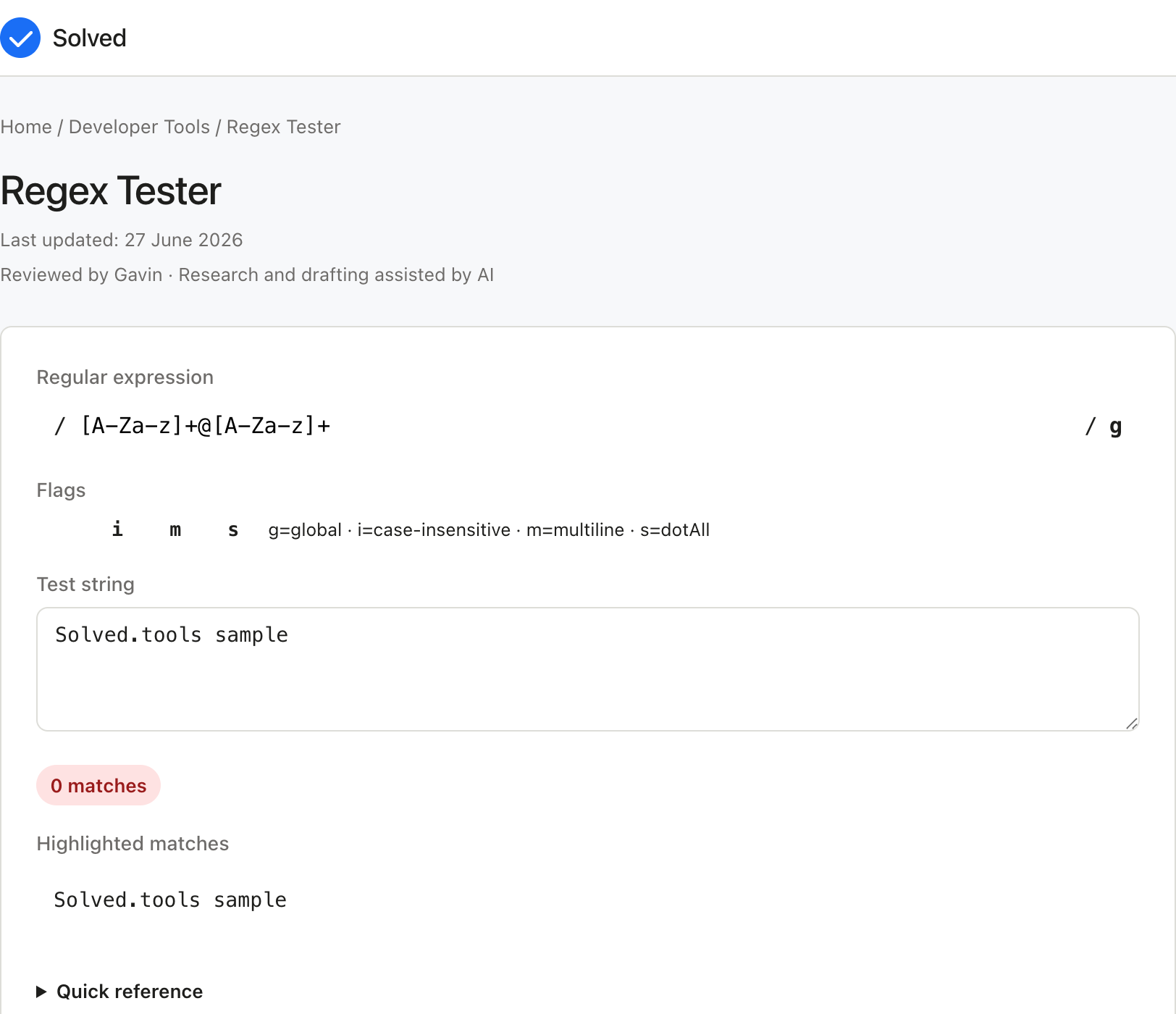
Captured from solved.tools on 10 September 2026.
Frequently Asked Questions
What is the difference between greedy and lazy matching? Greedy quantifiers (*, +, {n,m}) match as many characters as possible. Lazy quantifiers (*?, +?, {n,m}?) match as few characters as possible. For example, <.+> applied to <b>bold</b> matches the entire string, while <.+?> matches <b> and </b> separately.
What does the global flag (g) do? Without the global flag, the regex engine stops after finding the first match. With the global flag enabled, it continues scanning and returns all matches in the input. Always use the global flag when you need to find multiple occurrences.
What is a capture group and how do I use it? A capture group, defined by parentheses, extracts a specific part of a match. For example, in the pattern (\d{4})-(\d{2})-(\d{2}), applied to "2026-06-28", group 1 captures "2026", group 2 captures "06", and group 3 captures "28". Capture groups are used in substitutions and programmatic extraction.
Are regex patterns the same across all programming languages? Most modern languages support a similar syntax derived from PCRE, but there are differences in advanced features such as lookbehind assertions, Unicode properties, and possessive quantifiers. Always test your pattern in a tester that matches the regex engine of your target language.
Also try these free tools:
Inputs and Their Effects
Each field on the Regex Tester form plays a distinct part in the calculation.
- your regular expression pattern in the pattern field (without surrounding delimiters unless the tool requires them) - this value feeds the Regex Tester directly and shows up in the result.
- any flags you need, such as global (g), case-insensitive (i), or multiline (m) - this value feeds the Regex Tester directly and shows up in the result.
- Paste your test string into the text area - this value feeds the Regex Tester directly and shows up in the result. Editing one field of the Regex Tester changes the output in line with the formula, so a misplaced value is visible in the answer.
Common Mistakes to Avoid
The errors that come up most often with the Regex Tester are easy to spot once you know them:
- Entering a value in the wrong unit for your regular expression pattern in the pattern field (without surrounding delimiters unless the tool requires them); the Regex Tester answer is only right when the unit matches the label.
- Mixing conventions, such as percentages and decimals, where the Regex Tester formula expects one form.
- Rounding the inputs before the Regex Tester runs; keep the full values and let the tool round the final answer.
- Treating the Regex Tester result as exact when the inputs themselves were estimates.
When to Use This Tool
Use the Regex Tester when you have the inputs to hand and want a single, reliable answer quickly. The Regex Tester fits a well-defined question where the inputs are known and the output is a number you can act on. If the problem needs scenario modelling across many changing variables, a spreadsheet or a dedicated planning tool gives you more room than the Regex Tester to compare outcomes side by side.
How the Math Works
The calculation behind the Regex Tester follows the standard form for this kind of problem: Regular expressions are a formal language for describing string patterns, based on the theory of finite automata. A regex engine reads the pattern and compiles it into a state machine that processes the input string character by character. The Regex Tester applies that relationship in the order the algebra prescribes, converting inputs to consistent units first where the formula needs them.
Practical Tips
A few habits keep the Regex Tester results reliable:
- Confirm each input matches the label, especially your regular expression pattern in the pattern field (without surrounding delimiters unless the tool requires them) and any flags you need, such as global (g), case-insensitive (i), or multiline (m) if both are present.
- Work in one unit system throughout the Regex Tester instead of converting mid-way by hand.
- Sanity-check the Regex Tester output against a rough estimate before relying on it.
- Keep a note of the values you used so the Regex Tester calculation can be reproduced later.
Troubleshooting Unexpected Results
When the Regex Tester result does not match expectation, run through the usual suspects in order:
- Check the unit on your regular expression pattern in the pattern field (without surrounding delimiters unless the tool requires them) first; a unit mismatch is the most common cause of a surprising Regex Tester answer.
- Check the sign of each input; a negative where the Regex Tester expects a positive flips the result.
- Check the magnitude; a Regex Tester answer many orders of magnitude off is almost always a unit or decimal error.
- Re-run a simple round-number case by hand to confirm the Regex Tester is wired up correctly.
Related Concepts and Where This Fits
The Regex Tester fits alongside the other tools in its category, and the choice between them usually comes down to which inputs you already have. If the same numbers feed several tools, run them in one pass so the assumptions stay consistent across the comparison, which is where the Regex Tester earns its place.