JSON Formatter
Last updated: 27 June 2026
Reviewed by Gavin Meiring, Lead research and primary author · Doctoral Candidate (Corporate Governance) · Research and drafting assisted by AI
- JSON was invented by Douglas Crockford in 2001 as a simpler alternative to XML. Despite being a subset of JavaScript, it's now used in virtually every programming language.
- The 'J' in JSON stands for JavaScript, but JSON is language-independent. It's now the dominant data exchange format on the web — replacing XML almost entirely in REST APIs.
- JSON doesn't support comments. This was deliberate. Crockford removed comment support after seeing config files with conditional comments being used as a form of access control.
JSON Formatter
A JSON formatter takes raw, minified, or malformed JSON and outputs it in a cleanly indented, human-readable format. It is used daily by developers, API designers, data analysts, and QA engineers who need to inspect, debug, or share JSON data without wading through a wall of unformatted text.
How to Use the JSON Formatter
- Paste your raw or minified JSON into the input field.
- Choose your indentation preference: two spaces, four spaces, or a tab character.
- Click the format button.
- The tool outputs the JSON with consistent indentation and line breaks.
- If the input contains syntax errors, the tool highlights the offending line and describes the problem.
The Formula
JSON (JavaScript Object Notation) is a structured data format defined by RFC 8259. A JSON formatter works by parsing the input text into an in-memory data structure (a parse tree of objects, arrays, strings, numbers, booleans, and null values) and then serialising that structure back to text with controlled whitespace and indentation.
The parsing stage validates the JSON against the formal grammar:
- Objects are key-value pairs enclosed in curly braces:
{"key": "value"} - Arrays are ordered lists enclosed in square brackets:
[1, 2, 3] - Strings must be enclosed in double quotes (not single quotes)
- Numbers, booleans (
true,false), andnullare unquoted primitives - Trailing commas are not permitted by the standard
The serialisation stage then applies pretty-printing: each new key-value pair or array element starts on a new line, indented by a fixed number of spaces multiplied by its nesting depth.
Real-World Example
You call an API and receive this response:
{"user":{"id":1042,"name":"Sarah Jones","email":"sarah@example.com","roles":["admin","editor"],"active":true}}
After formatting with 2-space indentation:
{
  "user": {
    "id": 1042,
    "name": "Sarah Jones",
    "email": "sarah@example.com",
    "roles": [
      "admin",
      "editor"
    ],
    "active": true
  }
}
The structure is now immediately readable, making it easy to confirm the correct fields are present.
JSON Formatting vs JSON Validation vs JSON Minification
A JSON formatter pretty-prints valid JSON for readability. A JSON validator checks whether a string is syntactically valid JSON and reports errors if not. A JSON minifier does the opposite of formatting: it strips all whitespace to produce the smallest possible valid JSON string, which reduces payload size for API responses and storage. Many JSON formatter tools combine all three functions, letting you format, validate, and minify from the same interface.
Reference Table: The JSON mistakes that break a parse
Six inputs that look reasonable in JavaScript and fail in a strict JSON parser. The middle column shows the invalid form and the right column states the rule. Two spaces of indentation and a single quote inside a string are both valid; the failures above are structural.
| Mistake | Invalid form | Rule |
|---|---|---|
| Unquoted keys | {"a": 1} | Keys must be double-quoted |
| Single quotes | {'a': 1} | Only double quotes are valid |
| Trailing comma | {"a": 1,} | The last member must not carry a comma |
| Comments | {"a": 1} // note | JSON has no comment syntax |
| Leading zero | {"a": 01} | Numbers must not carry leading zeros |
| NaN or Infinity | {"a": NaN} | Only finite numbers are allowed |
Worked Example on Screen
The capture below shows JSON Formatter after the inputs were entered, with the result on screen. Enter the same values to reproduce it.
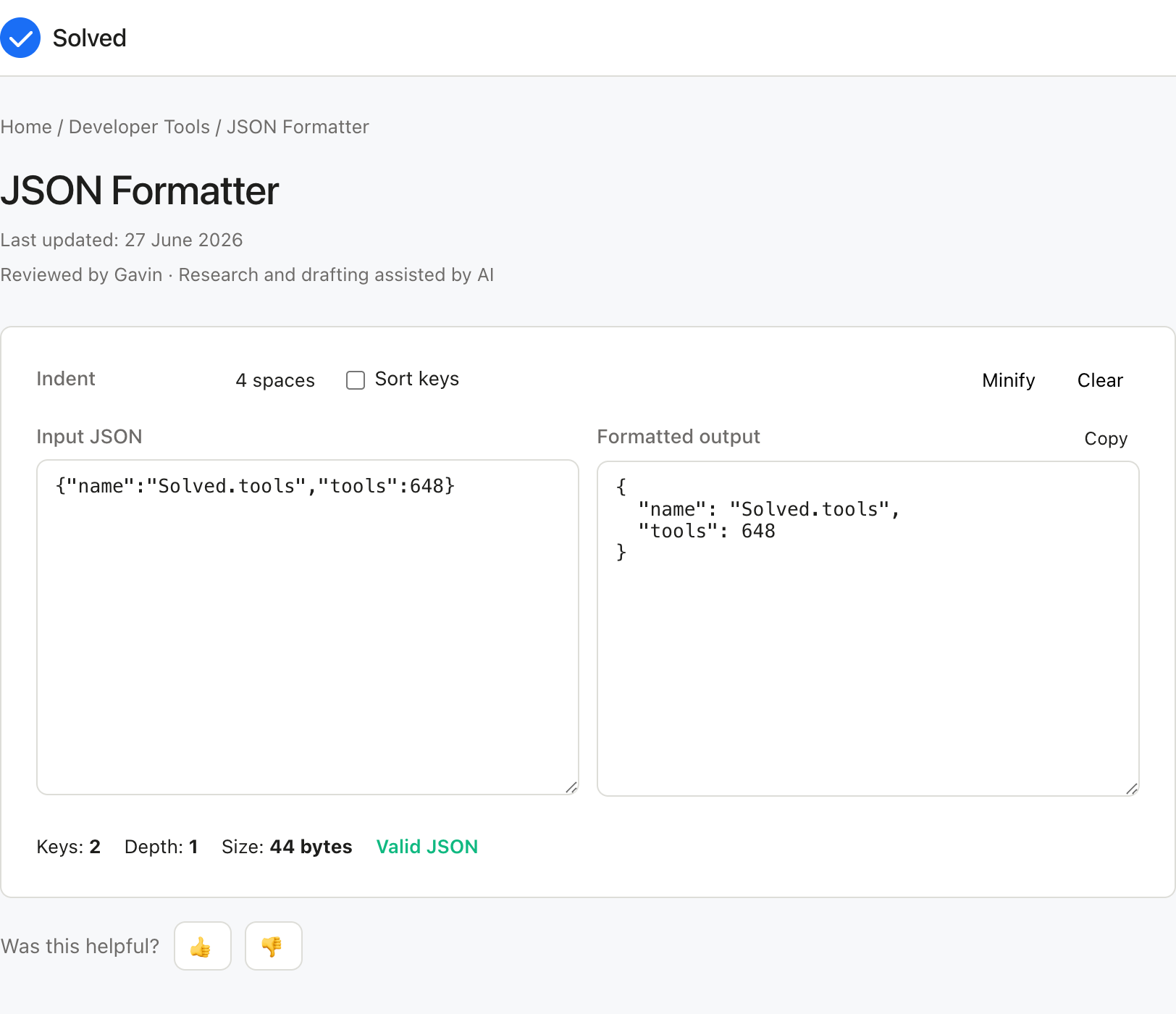
Captured from solved.tools on 10 September 2026.
Frequently Asked Questions
Why does my JSON fail to format? The most common causes are: single quotes used instead of double quotes, a trailing comma after the last item in an object or array, an unquoted key, or a missing or extra closing bracket or brace. The formatter's error message will usually point to the line where the problem occurs.
Is JSON the same as a JavaScript object? Not exactly. JSON is a serialisation format based on JavaScript object literal syntax, but with stricter rules. In JavaScript, object keys can be unquoted and strings can use single or double quotes. In JSON, all keys and string values must use double quotes. JSON also does not support comments, functions, or undefined values.
What is the difference between 2-space and 4-space indentation? Both are valid and widely used. The JavaScript and Node.js communities commonly use 2 spaces; many other communities prefer 4 spaces for greater visual depth. The choice is a matter of style and team convention.
Can the JSON formatter handle very large files? Browser-based formatters may slow down or time out on very large JSON files (several megabytes or more). For large files, a command-line tool such as jq or the Python json.tool module is more appropriate. Use the online formatter for typical API responses and configuration files.
Understanding the Json Formatter
The Json Formatter is one of the most-requested tools in the json formatter category because it condenses a calculation that would otherwise require manual work, a spreadsheet, or a specialist program into a single input-and-output step. whether you are a student, a professional, or a curious learner, the Json Formatter is designed to deliver a quick and trustworthy answer without forcing you to install anything or sign up for an account. Behind the scenes, the Json Formatter applies well-established mathematical or scientific formulas to the values you provide. the aim of Json Formatter is to remove the friction of hand calculation while still showing you the underlying method, so you can confidently interpret the result. Every calculation is performed locally in your browser, which means your inputs never leave your device.
When Should You Use the JSON Formatter?
Use the JSON Formatter whenever you need a quick, reliable answer that fits the tool's scope. Common situations for the JSON Formatter include homework problems, workplace tasks, financial planning, fitness or health tracking, and everyday curiosity. If the JSON Formatter answer will be used for a decision that has legal, medical, or financial consequences, treat the result as a starting point and verify it with a qualified professional. The JSON Formatter is free to use, requires no sign-up, and works on any device with a modern browser. You can run the JSON Formatter as many times as you like, change the inputs, and compare results side by side.
Common Inputs and How to Choose Them
Most JSON Formatter problems revolve around a small set of inputs.
- Paste your raw or minified JSON into the input field is usually the first value to pin down for the JSON Formatter.
- your indentation preference: two spaces, four spaces, or a tab character sets the context the JSON Formatter needs for a sensible result.
- the format button refines the JSON Formatter output where the data is available. Identifying the right values is the most important step for the JSON Formatter, because the answer is only as accurate as the data you put in. If a value is unknown, prefer a conservative estimate over a guess when using the JSON Formatter.
How to Interpret the Result
The numerical answer from the JSON Formatter alone is rarely the whole story. Read the units, the precision, and any warnings shown alongside the JSON Formatter result. Understanding the path from inputs to output in the JSON Formatter makes it easier to spot errors, communicate the result to others, and reuse the method for related problems in the future.
Worked Examples
A typical JSON Formatter run takes reasonable inputs, produces a sensible answer, and returns it in a single click. Example: You call an API and receive this response: {"user":{"id":1042,"name":"Sarah Jones","email":"sarah@example.com","roles":["admin","editor"],"active":true}} After formatting with 2-space indentation: json { "user": { "id": 1042, "name": "Sarah Jones", "email": "sarah@example.com", "roles": [ "admin", "editor" ], "active": true } } The structure is now immediately readable, making it easy to
Common Mistakes to Avoid
Common mistakes with the JSON Formatter:
- Mixing up units (for example, entering one unit when the JSON Formatter expects another).
- Forgetting to convert percentages to decimals or vice versa where the JSON Formatter formula requires it.
- Using a snapshot value that no longer reflects reality for the JSON Formatter, especially for time-sensitive inputs like prices, rates, or counts.
- Rounding intermediate steps too early and then carrying the rounded value forward in the JSON Formatter.
- Treating the JSON Formatter as a substitute for professional advice when the decision is high-stakes.
Limitations and Assumptions
No calculator is a perfect model of reality, and the JSON Formatter is no exception. The JSON Formatter makes simplifying assumptions to keep the math tractable: it ignores rare cases, applies default values where inputs are missing, and uses formulas that suit the typical situation rather than the exotic one. When your situation falls outside the typical case, the JSON Formatter result may drift further from the truth. If you need a more precise answer than the JSON Formatter provides, the next step is usually a specialist, a more detailed reference, or a domain-specific tool.
Related Tools and References
For more depth on the JSON Formatter topic, consult textbooks, academic papers, or reputable online resources. Reputable sources for the JSON Formatter include government statistics agencies, university extension services, and peer-reviewed journals. Wikipedia is a useful starting point for definitions and formulas behind the JSON Formatter, but always follow the citations to the original source before relying on a number. If you find that you need the same JSON Formatter calculation repeatedly, consider writing down the inputs and the result in a note so you can build a personal record over time.
Quick Reference
- Free to use: yes, no sign-up required.
- Privacy: all calculations run locally in your browser.
- Units: metric and imperial supported where applicable; check the input labels.
- Speed: instant, no page reload.
- Mobile friendly: yes, works on phones and tablets.
- Offline: once the page has loaded, the calculation continues to work without a network connection.
References - General-purpose math references such as Wolfram MathWorld and Khan Academy for foundational formulas.
- Wikipedia articles on the relevant topic, with citations to primary sources, cover the JSON Formatter background.
- Peer-reviewed journals and textbooks give the most rigorous treatments of the JSON Formatter method.Tools/tools/calculator) - Percentage Calculator - Unit Converter
Also try these free tools: